
The Basics
|
|
OR |
NOTE: If sending to Garmin Connect, you may need to sync your watch before you will see the workout there. |


- Just use the standard workout app on your watch in order to follow your workout plan.
Workout Writer Help: Writing Workouts in Plain Text
If you've ever tried creating a structured running or cycling workout for use on your Apple or Garmin watch, then hopefully you understand the frustration behind this app!
Workout Writer is designed to make it incredibly simple to create a workout by just describing it in your own words.
Write a workout in simple text, see an instant preview of what the app understood from your text, and then send that workout straight to your watch.
This page expands on the in-app examples, with more detail and extra variations you can copy/paste.
1) The Fundamentals
Write steps, one per line
A workout is usually a list of steps. Each step can include:
- A goal (distance or time) — e.g.
2km,10 min - An effort (a tag, pace, power, or heart-rate zone) — e.g.
Easy,5:00/km,350W,Z4 - An optional label (purely descriptive text shown on your watch)

Preview = what will be sent
As you type, the preview immediately shows exactly what Workout Writer has understood. If something looks wrong in the preview, tweak the text until it looks right.
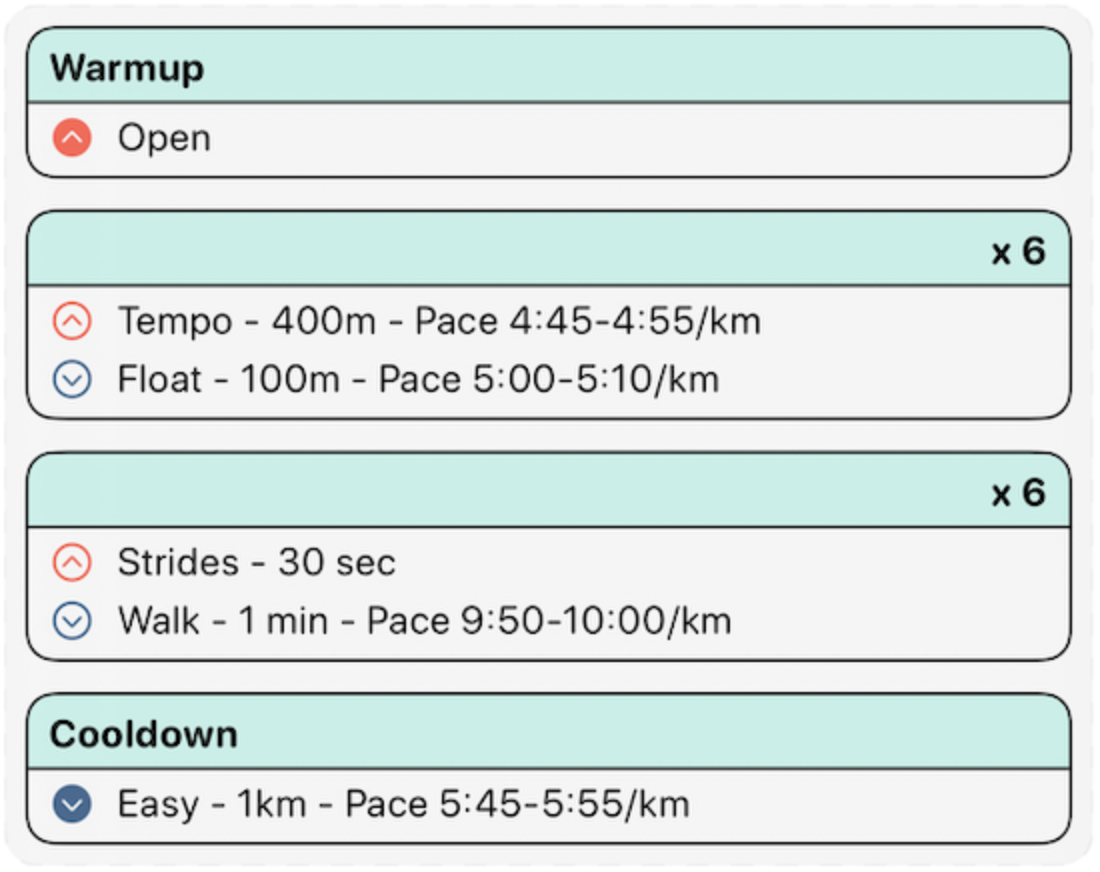
Comments with #
Use # to write comments for yourself. Anything after # on a line is ignored when creating the workout.
Example: a classic interval session
# Simple example workout
Warmup 2km Easy
6 x 800m Threshold, 400m Easy
Cooldown 10 min Easy
More examples
# Fartlek (time-based)
Warmup 10 min Easy
10 x 1 min Hard, 1 min Easy
Cooldown 10 min Easy

# Progression run
Warmup 2km Easy
20 min Z2
15 min Z3
10 min Z4
Cooldown 10 min Easy
2) Warmup & Cooldown Keywords
Warmups and cooldowns are just normal steps — but using a warmup/cooldown keyword helps the workout read clearly (and can be displayed nicely on watches and platforms).
Warmup keywords
WarmupWarm-UpWUW/up
Cooldown keywords
CooldownCool-downCDC/down
Examples
WU 2km Easy
CD 2km Z2
Warmup 10min
C/Down Easy
3) Repeats & Blocks
Inline repeats (quick and readable)
The most common pattern is repeats × work, recovery.
6 x 800m Threshold, 400m Easy
Multi-line blocks (more complex sets)
For blocks with multiple steps, put each step on its own line.
# Blocks start with repeats (sets / x), followed by the steps
6 sets
30 sec strides
45 sec rest
Bracketed blocks (great for readability)
You can wrap block contents in square brackets to make the structure obvious.
4 x [
1km Tempo
30 sec Float
]
Compact blocks on one line
Simple repeat patterns can be written on a single line, separated by commas.
6 x 1 min Threshold, 100m Float
More block ideas you can copy
# Ladder intervals
Warmup 15 min Easy
1 x 400m Threshold, 200m Easy
1 x 800m Threshold, 400m Easy
1 x 1200m Threshold, 600m Easy
1 x 800m Threshold, 400m Easy
1 x 400m Threshold, 200m Easy
Cooldown 10 min Easy

# Hill reps (time-based)
Warmup 10 min Easy
8 x 45 sec Hard, 75 sec Easy
Cooldown 10 min Easy
4) Specifying Effort
You can specify effort in a few different ways. Pick the style you prefer and keep it consistent.
A) Tags (simple, flexible)
Tags like Easy , Tempo , Threshold , Float are quick to type and easy to read.
You'll start the app with some standard tag names, but you can create them for any word.
Update your tags as your fitness level changes, and your workouts will reflect the new values.
2km Tempo
6 x 800m Threshold, 400m Easy
B) Pace / Speed
Runners can use specific values for pace in minutes per kilometre or mile:
500m 5:00/km
1 mile 7:30/mi
Cyclists can use specific values for speed in kph or mph:
10km @ 30 kph
20 min 18mph
C) Heart-rate
Either use specific values for heart rate e.g.
2min 150bpm
10min 110-140bpm
Or use heart rate zones:
2min Z4
10 min Z2
D) Power (common for cycling)
350W 1.5 miles
300-350W 5km
E) Cadence (spm / rpm)
170 to 190 spm # running cadence range
85 to 95 rpm  # cycling cadence range
5) Labels (Text on Your Watch)
Labels are like tags, but they don’t specify effort. They’re mainly for display — helpful reminders or motivation. Labels can also indicate that a step is rest (e.g. Rest , off ).
Simple rest labels
5 min Rest
2 min off
Quoted labels (any text)
Use quotes to turn any text into a label. This is great for coaching cues.
200m Sprint "Aaargh!"
2km Easy "Relax shoulders"
10 min Z2 "Smooth & steady"
Tip: if you use certain labels often, add them on the Tags screen so they’re recognized consistently.
6) Effort Ranges
You can specify an effort range for pace, heart rate, power, or cadence. This is useful when you want “somewhere between” rather than a single target.
Examples
4:30-5:00/km 500m     # pace range
120 to 150bpm 10 min   # HR range
300-350W 5km           # power range
170 to 190 spm 2km     # cadence range
Practical use cases
# Cruise intervals with a pace band
Warmup 10 min Easy
5 x 1km 4:10-4:20/km, 90 sec Easy
Cooldown 10 min Easy

# Long ride with power range (cycling)
20 min 180-210W
30 min 210-240W
10 min 160-190W
7) Step Goals: Distance, Time, or Open
Distance goal
2km Easy
Time goal
2min Walk
10 min Z2
Open goal (no distance or time)
If you don’t specify distance or time, the step is Open. This means you decide when to move on — usually by pressing Lap on your watch.
Threshold
Open goal examples (useful in real life)
# Warm up until you feel ready
Warmup Easy
3 x 5 min Threshold, 3 min Easy
Cooldown 10 min Easy

# Drills where you decide when to end each one
4 x [
"Drill: High knees"
"Drill: Butt kicks"
"Drill: Skips"
]
10 min Easy
8) Advanced: Multi-step Blocks on One Line
For workouts with a repeating pattern (like ladders or pyramids), you can write many work steps on one line. Workout Writer can inherit the effort and units from the final work step, and automatically insert the rest step between each work step.
Pyramid example (compact form)
2 x 100, 200, 300, 400, 300, 200, 100m Threshold, 30sec Float
What’s happening here?
2 xrepeats the whole pyramid twice100, 200, 300…are the work step distances- The
munit andThresholdeffort apply to every work step 30sec Floatis treated as the recovery step and is inserted between each work step
The same workout (long-form)
2 x
100m Threshold
30 sec Float
200m Threshold
30 sec Float
300m Threshold
30 sec Float
400m Threshold
30 sec Float
300m Threshold
30 sec Float
200m Threshold
30 sec Float
100m Threshold
30 sec Float
More advanced one-liners
# Ladder up, then back down — pace inherited from the last step
1 x 1, 2, 3, 4, 3, 2, 1 min 3:55-4:05/km, 60 sec Easy

# Cycling over/unders — power inherited from the last step
3 x 2, 2, 2 min 320W, 2 min 240W
9) Tips for Workouts That “Just Work”
- Use one step per line unless you’re intentionally using a compact one-line format
- Check the preview before sending — it’s the source of truth
- Keep units consistent inside a block (e.g. all meters, or all minutes)
- Be explicit when it matters: if you care about the exact target, use pace, power, or zones instead of a tag
- Use labels for coaching cues so you see them on your watch at the right moment
- Use Open goals when real life is messy (warm up until ready, rest until recovered)
If you ever see something unexpected, tweak the text until the preview matches your intent — then send it to your watch.